ISPConfig3 Installation mit Debian 13 auf Hetzner
SSH Key bereitstellen
Persönlichen SSH-Key auf Hetzner zur Installation bereitstellen um Login als root zu ermöglichen
Hetzner Console → Projekt auswählen → Sicherheit → SSH-Keys
SSH Ed25519 Key für Windows 11 erstellen
ssh-keygen.exe -o -a 100 -t ed25519 -C "[email protected] Windows11 2025.09.15"
type ~\.ssh\id_ed25519.pub
Image rebuilden
Festplatte mit dem Debian 13 Image und SSH Keys überschreiben
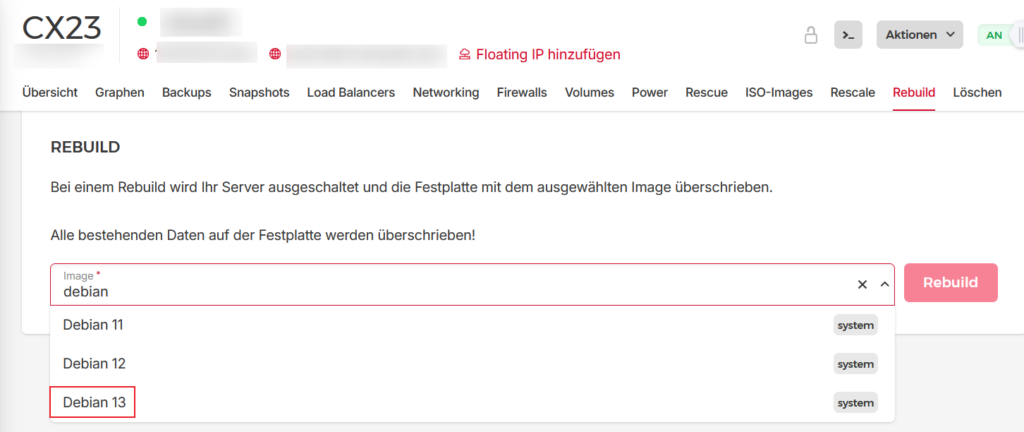
Debian 13 ist nun neu installiert. SSH Login als root.
Hostnamen konfigurieren
hostnamectl set-hostname ispconfigHosts-Datei konfigurieren
nano /etc/hosts127.0.0.1 localhost.localdomain localhost
127.0.1.1 ispconfig.domain.xx ispconfig
XXX.XXX.XXX.XXX ispconfig.domain.xx ispconfigTesten mit „hostname“ und „hostname -f“
hostname
hostname -f
ISPConfig installieren
wget -O - https://get.ispconfig.org | sh -s -- --use-php=8.3,8.4,8.5 --use-ftp-ports=40110-40210 --unattended-upgrades --no-dns --no-mailman --monit [email protected] --ssh-port=22 --ssh-permit-root=without-password --ssh-password-authentication=no --ssh-harden --i-know-what-i-am-doing
Fertig!
ISPConfig ist jetzt installiert. ISPConfig-Login auf Port 8080:
- https://host.domain.xx:8080
Firewall einschalten unter System | Firewall
ufw status
ISPConfig Standard-Port 8080 ändern
ispconfig_update.sh --force
ISPConfig Admin Password, MySQL root password, Monit password
grep 'password is' /root/ispconfig-install-log/setup-XXXXXXXX142510.log
Your Monit password is: xxxxx
Your ISPConfig admin password is: xxxxx
Your MySQL root password is: xxxxx
ISPConfig Admin Password ändern
ispc user set-password adminTweak Getmail, RspamD
Dovecot: Punkt im IMAP Ordner erlauben